
How to Copy Trade Memecoins on Solana: Beginner's Guide
A step-by-step walkthrough of copy trading on Solana with Dawn: funding your balance with USDC, finding a wallet worth copying on Fomo, and setting size, slippage, stop loss and take profit.
When it comes to executing a successful crypto strategy, choosing the right system is essential. After testing several copy-trading tools, I decided to focus this guide on Dawn. In my hands-on testing, I found its interface straightforward and intuitive, and the setup was much smoother than the other bots I tried. There are plenty of platforms out there, but Dawn offered a clean experience that felt right for this walkthrough.
Dawn lets you tailor trading parameters to your exact style, but trading always carries high risk alongside its rewards. This guide covers the essentials: how to deposit money into Dawn and how to set up your first copy trade, so you can manage your positions with better risk control.
What you need before starting
Before I jump into the execution steps, I make sure to have these core elements ready:
A Solana wallet
Go to the official Solana wallets page and choose one of the recommended options. Do your research and pick the one you prefer. I personally use Phantom. Always use the official links on Solana's website to avoid phishing and scam sites.
USDC on the Solana network
USDC is a digital dollar designed to stay at $1. It won't swing wildly like other crypto, but it is still not 100% risk-free.
Trading funds
Only allocate money you can afford to lose.
A Fomo account
Set up Fomo beforehand so you can browse its public trading leaderboard.
Step 1:Set up Dawn
To start using Dawn, open the bot in Telegram and type /start in the chat box.
The Dawn menu pops up with these options: Portfolio, Trending, Wallets, Limit Orders, Deposit, Withdraw, Transfer, Copytrade, Rewards, Help, Settings, Refresh and Close. Each has its own specific use.
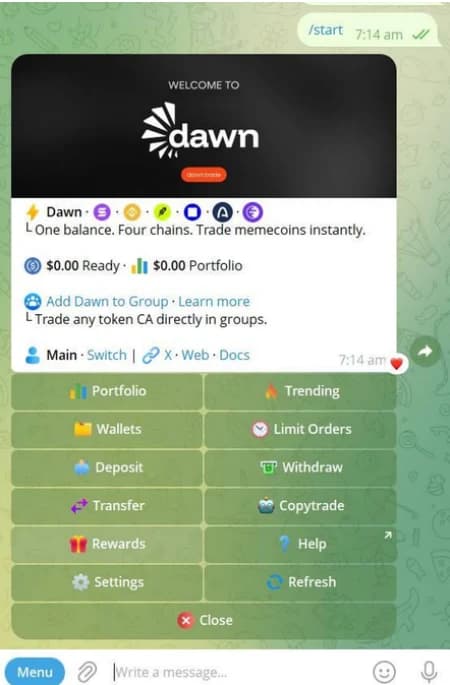
Dawn's main menu in Telegram after typing /start Step 2:Fund your Dawn balance
Once the menu is visible, follow these steps to add funds:
- Click the Deposit button.
- Choose the Solana chain. This walkthrough focuses on Solana because it is known for high speed and low transaction fees, which makes it a popular choice for fast-paced trading.
- Choose USDC as the token.
- Copy the unique deposit address shown in the chat.
- Open your personal Solana wallet and send the USDC to the address you copied. Always double-check the address before you send.
After sending the transaction, go back to Dawn in Telegram and click Check my deposit to confirm the USDC has landed in your balance. If you see "Checking for your deposit. Anything that has landed is credited within a few minutes", be patient and check again in a couple of minutes.
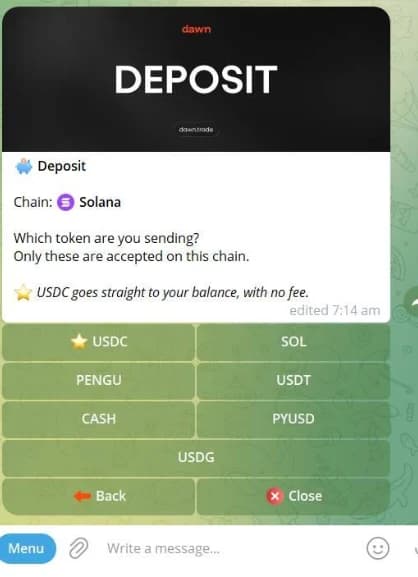
Dawn's deposit screen with Solana selected and USDC as the first token option Step 3:Find a wallet worth copying
Where to find wallets
To look for top-performing traders, I open my Fomo account. From the dashboard, click Leaderboard in the upper left corner to browse the best-performing traders.
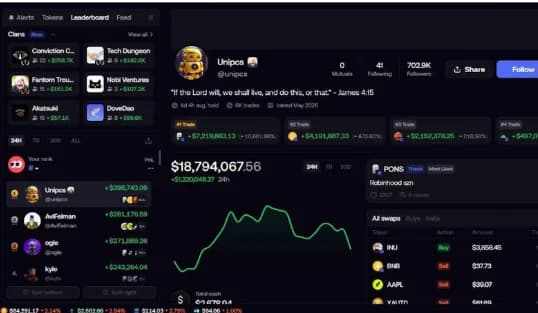
The Fomo leaderboard with a trader profile open What metrics actually matter
Finding the right trader to copy is the most important step. Don't just pick the top lifetime earner on the leaderboard. Look closer at their actual trading habits and find someone who matches your risk profile. When evaluating a wallet, check:
- Realised PnL
- Actual locked-in profits, not unrealised paper gains.
- Number of trades
- A large enough sample to show the strategy isn't a fluke.
- Win rate
- The share of profitable trades versus losing ones.
- Recent performance
- A trader who dominated six months ago might be struggling in the current market.
- Profit distribution
- Whether most of the profit came from one lucky trade or is spread across many winning positions.
- Average position size
- Whether their typical trade size fits your own risk tolerance and bankroll.
- Token liquidity
- Whether they trade liquid tokens or micro-caps that are highly volatile and hard to exit.
- Consistency
- How steady their performance has been over a long period.
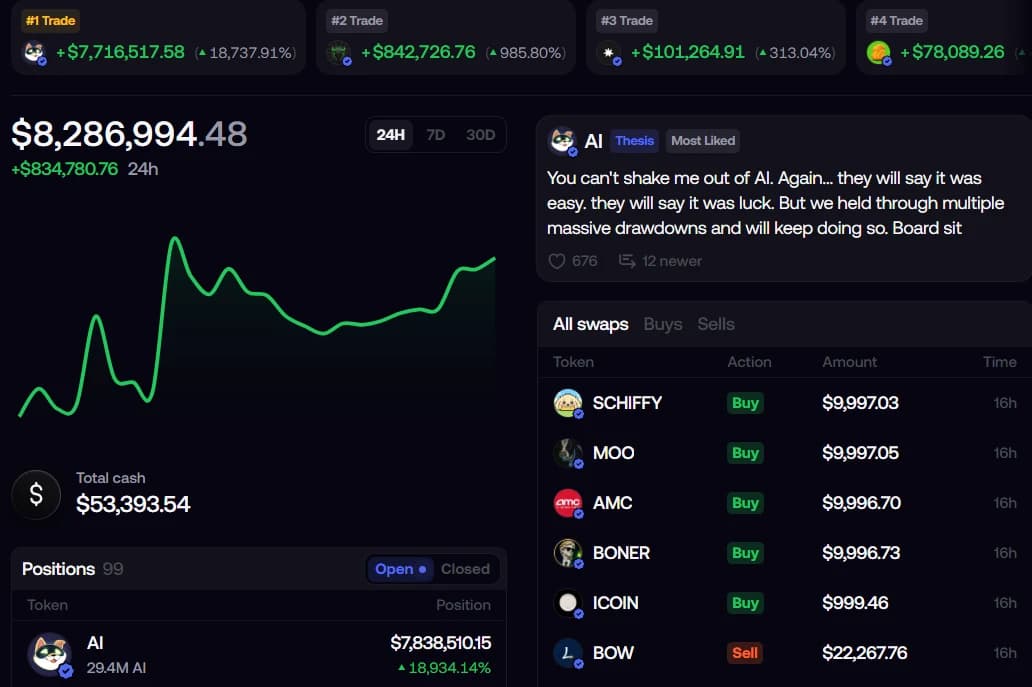
A Fomo trader profile showing top trades, PnL chart and recent swaps 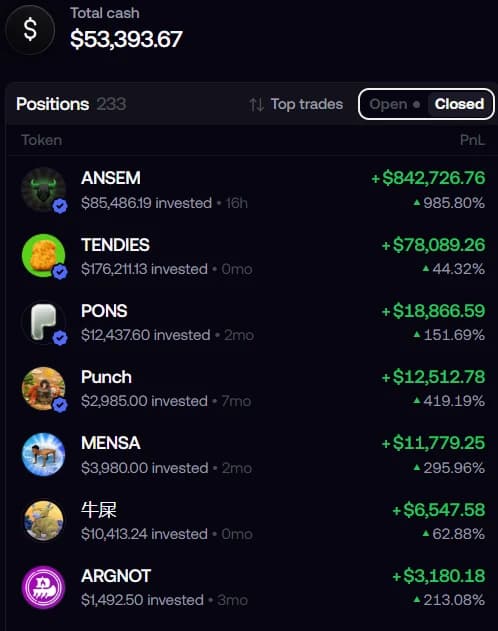
Closed positions on a Fomo profile, useful for checking profit distribution Red flags
Watch out for traders whose risk appetite swings massively from day to day. If their position sizes are completely unpredictable, copying them could burn through your USDC in an instant.
Step 4:Add the wallet to Dawn
Once I find a trader I like on the Fomo leaderboard, I link them to Dawn:
- Click the share button on their Fomo profile to get their direct link, or simply copy their @handle.
- Go back to Dawn on Telegram, open the main menu and click Copytrade.
- Click + Follow a Trader.
- Paste their Fomo handle or profile link into the chat and press enter.
- Dawn checks that the handle is valid. For this walkthrough I chose @unipcs, one of the highest-ranked traders on the Fomo leaderboard at the time.
- Click Keep @unipcs to save the task name, or type your own.
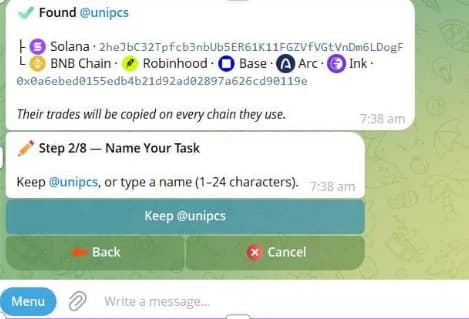
Dawn confirming the Fomo trader and asking for a task name Step 5:Configure your copy trade
Fixed amount vs % of the leader's buy
- Fixed amount
- Pick one of the preset buttons ($1, $5, $10, $25, $50) or type your own dollar amount to spend on each copied buy. This keeps your risk plan simple so you don't burn through your USDC balance.
- % of the leader's buy
- Your trade size is no longer fixed. It depends on how much the leader spends, based on their own risk appetite that day. You type the exact percentage you want to mirror.
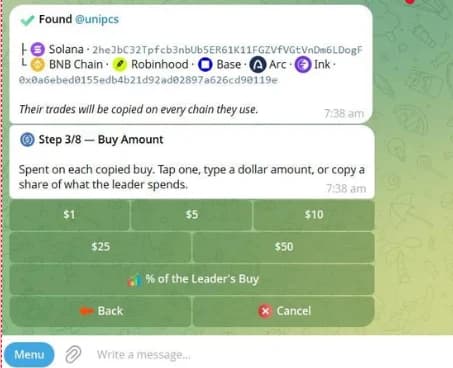
Dawn's buy amount step with fixed dollar options and a percentage option Buys only vs buys + sells
- Buys only
- You enter a trade automatically whenever the leader buys, but it's up to you to decide when to take profit. This setting is not fully automated because you close trades yourself.
- Buys + sells
- No manual work needed. Dawn automatically tries to mirror the trader's buys and sells, although your execution price can differ because of slippage, liquidity and timing. If the leader takes profit or cuts a loss, the bot immediately tries to do the same for you.
Because crypto prices move in milliseconds, you might get a slightly different entry or exit price than the trader you are following.
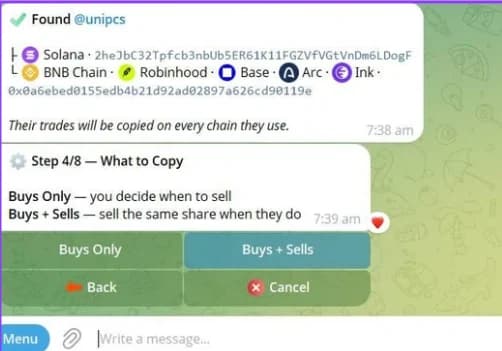
Dawn's "What to Copy" step with Buys Only and Buys + Sells Slippage
In volatile trades, the price can jump up or down in an instant because of news or a whale pumping or dumping the token. To handle this, choose how far the price may move before a copy is refused (10%, 15%, 20% or 30%, or type your own). If the price moves beyond your limit, Dawn skips the trade to protect your position.
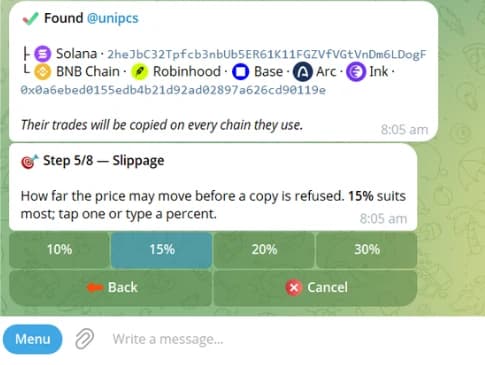
Dawn's slippage step, with 15% suggested for most traders Stop loss
I consider a stop loss a crucial part of risk management. When a trade isn't going your way, a stop loss sells everything before the loss gets worse. Pick a level you are comfortable with (-10%, -20%, -30%, -50%), type your own, or skip it.
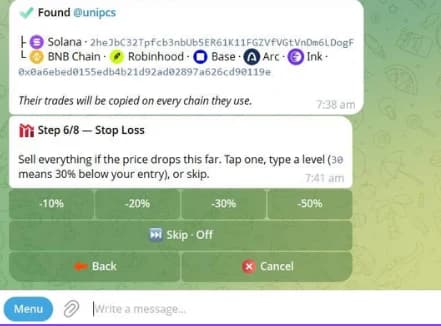
Dawn's stop loss step with preset levels and a skip option Take profit
A take profit helps you lock in winnings on a successful trade. Choose a level (+50%, +100%, +200%, +500%) that fits your plan, but use it with discretion because prices move unpredictably. Don't be greedy.
Market cap filter
Market cap is a quick way to judge how volatile a token is. The smaller the market cap, the more volatile the token, because it doesn't take much money to move the price. Choose a minimum ($50K, $100K, $250K, $1M), type your own, or skip it depending on your risk appetite.
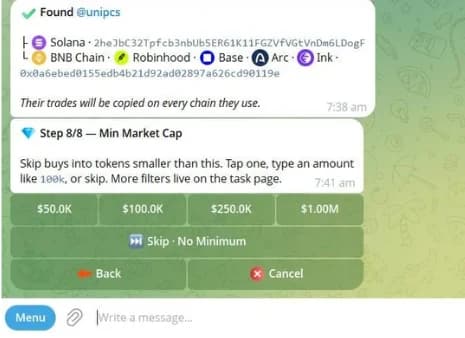
Dawn's minimum market cap step Step 6:Review and create your task
After you configure everything, Dawn shows a review summary so you can double-check every setting. Here is the setup I used for this example:
My settings7 settings- Trader
- @unipcsExample only, not a trader to copy
- Amount per buy
- Fixed $50
- Mirror sells
- On
- Slippage
- 15%
- Stop loss
- Off
- Take profit
- Off
- Min market cap
- Off
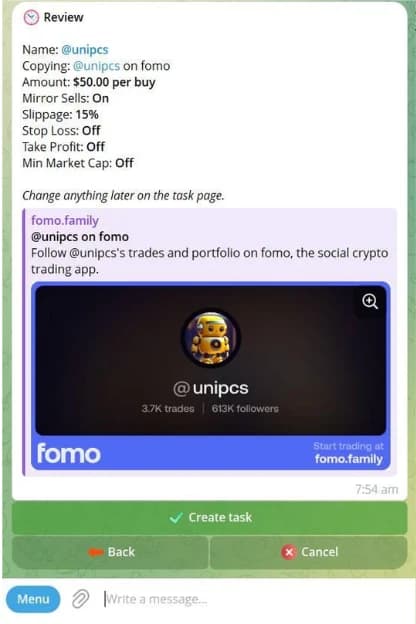
Dawn's review screen before creating the copy trade task If you change your mind, click Back to adjust your choices. Once the settings match your style, click Create task.
Mistakes to avoid
No risk plan
Jumping into copy trading without a clear risk plan can burn through your USDC fast.
Wrong wallet address
Not double-checking the deposit address before sending funds can cause mistakes you can't undo.
Oversized percentage copying
Using % of the leader's buy without realising a leader's large buy can overwhelm a small balance.
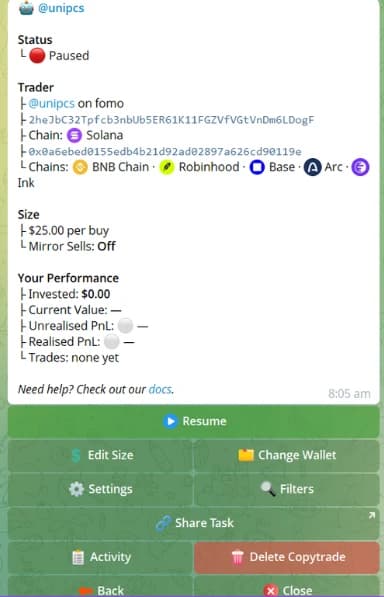
How to pause or edit a copy trade
Once your task is live, Dawn gives it its own dashboard. This is your command centre for the copy trade:
- Open the task for that trader inside Dawn's Copytrade menu.
- Check how it's performing: Invested, Current Value, Unrealised PnL, Realised PnL and total Trades.
- Click Resume or Pause to turn the copy trade on or off whenever you want.
- To change settings without deleting the task, use the Edit Size, Settings or Filters buttons at the bottom of the dashboard.
Final thoughts
Copy trading is a great way to save time, but it isn't a set-and-forget money machine.
The settings you choose and the wallets you follow will make or break your results. Don't rush in with big numbers. Start with small amounts you are completely fine losing, see how the bot behaves, and keep a close eye on your limits. Just because a wallet did well in the past doesn't mean every future trade will be a winner. Stay smart and manage your risk.
FAQ
What should I do if my deposit doesn't show up right away?
When you click "Check my deposit", you may see "Checking for your deposit. Anything that has landed is credited within a few minutes". Don't panic. Wait a couple of minutes and check again.
How does slippage protection save my capital?
If a whale pumps or dumps a coin and the price spikes, your copy could fill at a terrible price. With a slippage limit set, Dawn skips the copy trade if the price moves past your limit.
Can I withdraw my money from Dawn whenever I want?
Yes. The main menu has Withdraw and Transfer buttons right next to Deposit, so you are never locked in and can send your USDC back to your own Solana wallet at any time.
Can I copy any Solana wallet?
Yes, as long as it is a public wallet and the person trades through the usual apps Dawn can see. If they buy through a rare or unsupported app, the bot won't see those trades and can't copy them.
Can I pause or edit a copy trade after starting it?
Yes, whenever you want. You can pause the bot, turn it back on, change how much you spend, or adjust your safety limits at any point from the task menu.
Will I get exactly the same return as the wallet I copy?
Not exactly. Even with perfect copying, your numbers will differ a little. Prices move fast, so your buy or sell price may be slightly higher or lower than theirs, and network delays and your own size limits also affect your results.
Do I need to keep Telegram open for the bot to work?
No. Once you click "Create task", the bot runs on Dawn's own system. You can close Telegram, turn off your phone or lose internet, and it keeps working in the background.
How much money do I need to start?
There is no minimum to start, but you need enough USDC to cover the trades you want to copy.
Can I follow more than one trader at the same time?
Yes. Just watch your balance closely. If you follow three traders and they all buy at the same time, they could drain your balance very quickly.
What happens if the trader I copy buys a scam or rug pull?
The bot doesn't detect scams or rug pulls. It copies whatever that wallet buys, so if the trader buys a scam coin, the bot buys it for you too. That's why you need to choose who you follow very carefully.
Tools mentioned in this guide
Read our full review or head straight to the official site.

Dawn
FeaturedTelegram Bots · Trading Bots · Copy Trading · Sniping & Automation
Telegram trading bot that trades memecoins on Solana, BNB Chain, Base, Robinhood Chain, Arc, Ink and HyperEVM from one USDC balance, with gas covered, no bridging, copy trading, and limit, ladder, DCA and TP/SL orders.
dawn.trade
Fomo
FeaturedTrading Terminals · Analytics
Social-first mobile and web trading app for memecoins on Solana, Base, BNB Chain and more, with a feed of what traders you follow are buying, leaderboards, alerts and gasless swaps.
fomo.family